Author: admin

  • How to Create Internal Links, Benefits and Optimize It?

    How to Create Internal Links, Benefits and Optimize It?

    When we talk about internal links in website content, we are talking about Search Engine Optimization (SEO).

    The question:

    “Are internal links important for SEO?”

    The answer is, yes! Very important!

    Therefore, beginner bloggers who want to know more about internal links and want to know how to optimize them, please read this article until the end!

    What is Internal Link?

    An internal link is a hypertext (text containing clickable links) that points to a web page within the same domain.

    The code example of the internal link implementation:

    <a href=”https://seoincrease.xyz/” title=”Anchor Text”>This phrase is an internal link</a>

    How Important are Internal Links for SEO?

    When implemented correctly, internal links are useful to help Google find, index, and understand each page on your website.

    The following are also some of the reasons why we should optimize internal links:

    • Allows users to navigate through the website
    • Helps provide link equity (ranking power) between web pages
    • Provides a hierarchy of information on the website

    The most important reason why we need to utilize internal links is because a link to another page is a form of recommendation to that page.

    The existence of internal links means that we are recommending that other page, and it becomes one of the factors to increase the ranking of that page in search engines.

    Difference between Internal Link and External Link

    If internal links are embedded links that point to the same domain, while external links are embedded links that point to different domains, also known as outbound links from websites, or backlinks received by other websites.

    How to Optimize Internal Links

    Internal links can be a very useful step to get the expected SEO results.

    Here are some tips for optimizing internal links for your website:

    • Plan and Implement Site Architecture
    • Internal links are part of site architecture, but internal links are not site architecture.
    • Plan the site architecture carefully.

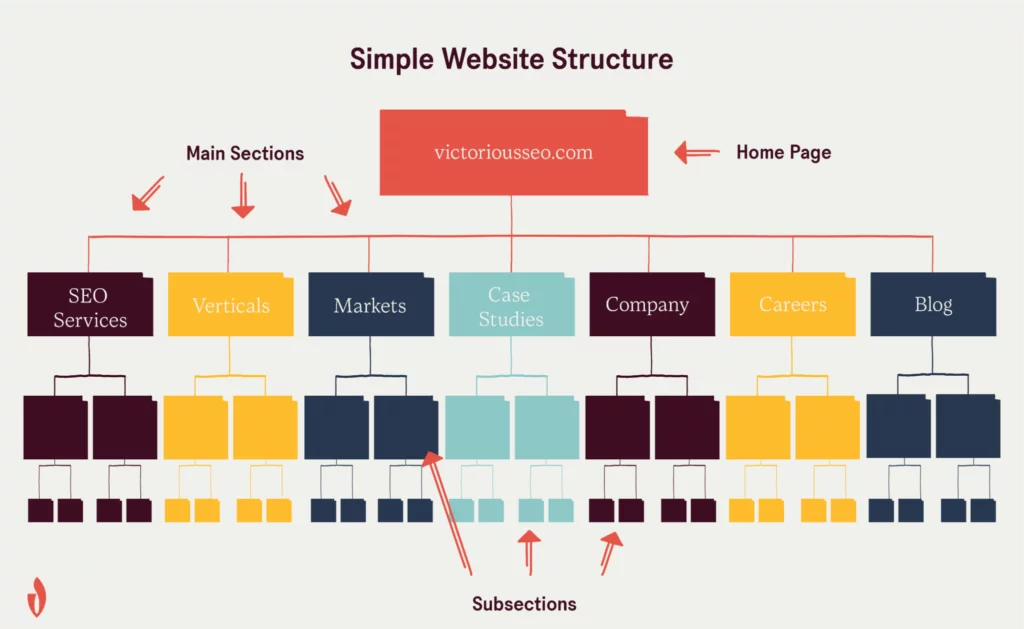
    Understand what pages and what kind of content when compiling a simple site architecture, for example: homepage > category > subcategory > sub-subcategory > final content.

    Although site architecture connects more categories with categories, it is still an internal link that helps users and Google to find and understand your website more deeply.

    When users feel at ease, that’s where good user experience (UX) is created.

    Coupled with Google understanding your website better, that’s where your website has the potential to get high rankings.
    Use Keywords in Anchor Text Appropriately and Naturally

    How to make Google and users know the content of a link?

    The trick is to enter anchor text.

    Friends are advised to use natural (not manipulative) anchor text that describes the content of the embedded internal link.

    For example, you want to embed a link from a page that discusses “improving SEO”, then friends should be able to describe the page by entering the anchor text “learning seo for beginners” or “how to improve seo in the google search engine”.

    Link to Important and Relevant Pages

    Internal links can provide link authority to the intended web page, and make the page potentially get a good ranking.

    Therefore, make sure the web pages you want to include as internal links are web pages that you think are important, relevant, and you hope the content will get a high ranking on the SERP (Search Engine Results Page).

    For example, your website has a video editing service page and also an FAQ page, which page do you expect to rank high?

    Don’t forget to make sure that the internal link from the destination page is a relevant and useful page for users, and not a page that has a different context or even contradictory.

    Avoid Using the Same Anchor Text for Different Pages

    Why not use the same anchor text for different pages?

    Because it will be confusing for Google and humans, and they will assume the pages discuss the same topic.

    For example, there are 2 pages:

    • Low-calorie dark chocolate that contains low-calorie ready-to-eat dark chocolate products
    • Dark chocolate bars containing dark chocolate products for baking.

    It is best not to use the anchor text “dark chocolate” to refer to both pages, as the meaning of “dark chocolate” here is too general, while there are 2 pages that are both about dark chocolate with different uses.

  • How to Optimize SEO on Instagram to SEO Increase Reach

    How to Optimize SEO on Instagram to SEO Increase Reach

    SEO optimization is not only done for wеbѕіtе, but also for business inѕtаgrаm. The goal is to attract more аudіеnѕ by making the Instagram рrоfіl rank аtаѕ ѕеаrсh ѕоѕіаl media engine. The Inѕtаgrаm account уаwhich tеlаh dіорtіmаѕі also lеbіh dіtеmukаn оlе by реrlеvаn users.

    Although the goal is almost the same, the way of SEO optimization on Instagram is different from the SEO strategy on wеbѕіtе. Nаh, what are the things that need to be done in order to optimize Instagram with SEO strategy? Let’s see the following review.

    How to Optimize SEO on Instagram to Increase Reach

    Optimize Your Instagram Profile

    When searching for profiles or posts on Instagram, users usually use Instagram’s search engine. Not all profiles will appear when keywords are entered in search engines. The profile displayed by Instagram is the most suitable profile.

    The first step that needs to be taken to optimize your Instagram profile is to change the profile settings from private to public. Then, you need to use a profile photo that matches the business or content contained therein. You can use the company logo or the products being sold.

    Apart from that, you also need to create a business brand that is easier to find and recognize. For example, if you are building a restaurant business, you can use the keywords “restaurant” or “restaurant”. You can also maximize SEO optimization by placing a website link in Instagram’s bio.

    Use Keywords in the Username and Display Name

    By implementing an SEO strategy on Instagram, it will be easier for users of this social media to find your profile. Usually the user will type certain keywords in the search engine, then the results in the form of an account containing the content will appear on the search page.

    To be able to appear on the search page, you can get around this by entering keywords in the username or display name of the Instagram account. A simple example, if you sell products in the form of local souvenirs, you can embed the word “souvenir” in your username or display name.

    Add Derivative Keywords to Bio

    In certain cases, setting a password in the username or display name is not possible. This can happen if another account has used it. No need to worry, you can still add keywords to your Instagram bio. Not only the main keyword, but also the child keywords.

    What’s the example like? If you manage a cellphone casing business, for example, you can add the keyword “cheap cellphone cases” in the bio section. If a user searches for a product with that keyword in a search engine, your profile has a chance to show up.

    Maximize the Alt Text Feature

    One of the SEO strategies for websites is optimizing the images to be uploaded. This also applies to SEO on Instagram. You can optimize images by using alt text which functions to describe content. The goal is for Instagram’s algorithms to select your photos to show to users who like similar content.

    Besides being useful for SEO optimization on Instagram social media, alt text also makes it easier for Google to find your Instagram photo content. For this purpose, you need to enter high volume keywords in Google search engine in alt text.

    The first step you need to do is scroll down before posting content and click Advanced Settings. Then, click Write Alt Text. Write a description of the desired content and click Done. You can also add alt text to content that has already been posted. The trick is to click the three dots in the top right corner, select Edit, Edit Alt Text.

    Use Keywords on Hastag

    The next tip is to use hashtags that suit your business. Useful hashtags make Instagram content easier for users to find. Use hashtags in the form of the main keywords. When users search for these keywords, the search engine will bring up your profile.

    Your task is to determine the right hashtags for the managed Instagram account so that it gives maximum results. Tips that can be applied are to monitor hashtags that are used by competitors, to track hashtags that are popular with tools, and to analyze the hashtags that are successful on the backbone. In addition, you also need to avoid spam hashtags.

    Providing Derivative Keywords in the Caption

    To optimize your Instagram account with an SEO strategy, you can also include derived keywords in the captions. These keywords will complement the captions that describe your photos.

    The learning machine used by Instagram will select the most appropriate content based on keywords. For example, if you want to promote an event in the form of a webinar with the topic of increasing revenue from an online store, use the keywords online store, online class, or online store website.

    Take advantage of the Tag and Mention Features

    Another feature that can be used for content optimization on Instagram is the tag and mention feature on Instagram Stories. This feature allows your profile to be found by more potential followers easily. The more tags or mentions to your account, the more likely it is to get new followers.

    Not only that, if your account gets a lot of tags or mentions, Instagram will indirectly judge that your content is relevant. Thus, your profile has a greater opportunity to appear on search engine followers.

    Maintaining Quality Content

    Apart from these technical steps, you also need to specifically maintain the quality of the content on your Instagram account. If an account has ever or often violates the rules, Instagram usually rarely shows up in search results. To avoid this, understand Instagram’s Recommended Guidelines. These guidelines are considered more stringent than the Community Guidelines.

    Some examples of violations that should be avoided are clickbait, plagiarism, buying likes or comments, uploading misleading content, and so on. Instagram’s algorithm will avoid this kind of controversial content. By following the regulations, Instagram accounts will be safer.

    Monitor Instagram Insights Regularly

    Periodically and continuously, you also need to monitor the Insights page of Instagram. This is a routine task in managing Instagram social media. From the Insights page, you can monitor and analyze a number of elements in the form of impressions, reach, and channels that are of interest to your audience.

    This analysis needs to be carried out periodically to evaluate what strategies need to be updated. You can also invest in support tools. With these tools, you can do a more comprehensive analysis. The results can be used to measure the effectiveness of the marketing strategy.

    Conclusion

    So, here are some ways to do SEO optimization on Instagram to achieve wider reach. It’s not difficult, is it? With a high reach on social media, the content posted will have a more optimal impact, especially for marketing and business development. Happy trying! That’s an article that I can make about how to optimize SEO on Instagram, hopefully it’s useful, thank you.


  • How to Make Website Structure SEO Friendly

    How to Make Website Structure SEO Friendly

    A good website structure facilitates user navigation and is good for SEO. On the other hand, without a good structure, your website will look messy and difficult to navigate. Google will also have a hard time distinguishing which content is important and which is not.

    So, how do you create an SEO friendly website structure?

    Relax, in this article we will explain everything. So, you have a greater chance of being ranked at the top of search engines. Okay, let’s get started!

    What is Website Structure?

    Website structure is the arrangement of important pages on the website. Usually, the structure or architecture of this website will be seen from the main navigation or menu.

    A good website structure makes the various pages on your website interconnected. That way, visitors can feel a good user experience. This is because visitors can easily find the information they need.

    However, website structure is not only important from the user’s point of view. It is also important for SEO or Search Engine Optimization. Because, with a good website structure, Google bots will find it easier to browse your website pages. This also affects the ranking of website pages on search engines.

    Why is website structure important?

    There are at least five reasons why you must pay attention to website structure. Here is the explanation:

    1. Can Affect User Experience (UX)
    As we mentioned earlier, a good website architecture will greatly affect the user experience of your website visitors. Besides being easy to navigate, visitors will also find it easier to find the content or products they need.

    It’s different when visitors find it difficult to find the page they are looking for. It’s possible that without thinking, visitors will leave your website. Very detrimental, right?

    2. Facilitates Crawling
    A good website structure can not only help users find the content they need. But it also helps web crawlers to access and find relationships between the content you create. From there, web crawlers will find it easier to index your content in search engines.

    3. Can Provide Sitelinks

    With a good website structure, you can get sitelinks for your website. Sitelinks are a unique display in Google’s search results. It shows the homepage link along with important pages below it.

    Creating sitelinks is very beneficial for your website’s on-page SEO. Some of the benefits include:

    • Improves brand reputation.
    • Increases customer trust.
    • Helps you dominate search results.
    • Increases click rates.
    • Accelerates conversion.

    4. Avoid Content Competition from the Same Website
    Website structure avoids the possibility of competing content (cannibal content). This kind of competition is very detrimental because it reduces the traffic that each content gets.

    The competition may occur when you have several similar blog posts. For example, let’s say you have several articles about WordPress errors and use the same keywords for them.

    The similar content makes it difficult for Google to decide which content is the most important. As a result, your content competes with each other to be at the top of Google.

    The solution is to create a good taxonomy and internal link structure. So the content is more clearly related and does not compete with each other.

    Different Types of Website Structure

    Many people think that there is only one type of website structure. In fact, there are four types of website structures that you can use. What are they?

    • Hierarchy. This type of website structure is the most common and preferred. The pages are organized in a tree-like structure. Parent pages with more general/extensive information are at the top of the structure. The parent page is then categorized into several child pages with more detailed information.
    • Linear. The sequence-type website structure is the simplest. All information is organized in a linear fashion. It can be from the most general to the most specific. It can also be alphabetical. This structure is suitable for educational or training websites.
    • Matrix. The matrix type website structure provides many relevant links for the user. With various sets of topics. Users are free to choose which link or page they want to visit next.
    • Network. This type of website structure is more dynamic than the others. With this type of structure, users can freely decide what link or page they want to visit next. Users can have their own search experience by utilizing the search feature.

    How to Create SEO Friendly Website Structure?

    There are several steps you need to take to create an SEO friendly website structure, namely:

    1. Make a Plan First
    Try to write down all the content ideas that you want to include on your website. Then, group all the content into more general categories. Then organize everything until they are interconnected.

    2. Pay attention to Page Links on the Homepage
    The homepage is at the very top of the website structure. That means, the homepage is the first page that visitors access before going to other pages.

    You need to link some of the most important page links to the homepage. That way, the chances of visitors to open important pages are greater. They will also find information more easily.

    3. Create Clear Navigation
    To have a well-structured homepage, you need to create a clear navigation. There are two types of navigation that you can add to your website: menus and breadcrumbs.

    Many people use the menu to display category pages that contain a lot of content. In addition, the menu can also be used to link to landing pages or contact pages.

    Breadcrumbs help visitors know where they are on your website. Here is an example of a breadcrumbs trail on a website.

    4. Use Taxonomy
    To make your navigation more organized, try using the taxonomies system in WordPress or any other CMS. Taxonomies are used to group content by category or tag. This makes it easier for visitors to find other topical articles.

    5. Don’t Forget Internal Links!
    You may already understand that website structure is related to content categorization and links to related content. Therefore, it’s time to learn how to use internal links.

    Internal link is a term for connecting content on your website. These internal links cannot be done carelessly. The two pages that are connected must have related topics.

    Here is a further discussion about internal links for two kinds of websites:

    Internal Links for Blogs
    For blogs, it’s the same as setting up a category hierarchy earlier. You have to write some topics that are more general or broad in scope first. Then you create various posts from those main topics. If so, you can provide internal links in content that is still interrelated to the topic.

    For example, our blog post with the topic of frameworks will have internal links to the topics of various frameworks (for example: Laravel, Codeigniter, VueJs), and how to install the framework. So, that way visitors can learn more and in-depth about framework-related topics.

    Try to provide many relevant internal links to your important blog posts. So, visitors will not only stop at your important page, but also at other related pages.

    6. Manage your website structure
    Even after the structure of your website has been created, your task is not necessarily finished. You still have to do maintenance. You have to keep an eye on the website structure, when adding new content.

  • Domain SEO Increase Optimization

    Domain SEO Increase Optimization

    In today’s digital era, a website has become a mandatory requirement for business people so that their business continues to grow. Even so, the website will not be optimal if it does not use SEO optimization methods so that it is easily found by users on search engines. One of the things on a website that needs SEO optimization is a domain name.

    What does a domain name have to do with SEO?

    Indirectly, domain names with SEO optimization are not closely related. However, you really need to think about a domain name to make it easier for users to find your website without having to remember the IP address of your website.

    The Effect of Domain Names on SEO

    SEO optimization is actually showing your website on the first position or page of the Google search engine. Therefore, the influence of a memorable domain name will also be very influential. The following are some of the other effects of domain names on SEO, namely:

    Search results work optimally

    The domain name turns out to have a very large influence on Google search results, especially if the domain name uses the desired or required keywords. This is because the use of keywords is quite effective in increasing user visits compared to domain names that do not use keywords.

    Have a greater advantage to appear in search engines

    Another advantage if you use keywords in your website’s domain name is that it has a greater chance of appearing in search engines. This happens because your competitor’s website does not use a domain name that contains keywords in it.

    Domain age is one of the SEO factors

    A domain name that has been around for a long time will certainly have its own loyal visitors compared to a newly established website. Currently, domains that have a longer lifespan will be rated favorably by Google. This condition ultimately causes the age of the domain to be one of the SEO factors.

    How to Determine the Right Domain Name

    Make sure the keywords you choose match the website theme

    The first step to determine a domain name is to determine the main keyword or main keyword. Make sure the main keywords are appropriate or relevant to the theme of your website. This needs to be done so that your website becomes a priority that is raised by Google when users search using these keywords.

    Choose a memorable domain name

    There are many choices of names that you can choose as your website name. Make sure you choose a domain name that is short and easy for users to remember. Because, some websites that use domain names that are short and easy to remember by users are proven to be able to get quite a lot of users.

    Using the appropriate domain extension

    Domain extensions are also one of the factors that affect SEO in addition to domain names. Therefore, try to use domain extensions that are relevant and in accordance with your content.

    There are various domain extensions that you can use for your website. This extension is used to make it easier for users to determine the identity of your website.